Streamline your event merchandise sales with efficient Onsite Pickup
b.stage now offers an Onsite Pickup feature, allowing fans to order and pay for merchandise using the b.stage app before the event. After receiving an app notification, they can conveniently collect their orders at the event's merchandise booth.
Pay up front, pick up later — that means less waiting for fans and more efficient merchandise sales for you. This approach works for any offline event, whether it’s a concert, festival, pop-up store, or fan meetup. If you’re organizing an in-person event, consider implementing an Onsite Pickup option. It’s a great way to avoid long lines for fans, while keeping sales, efficiency, and inventory all under centralized control.
Introducing Onsite Pickup
How to use the b.stage Onsite Pickup feature
Let's assume that this is a 40,000-seat concert using the Onsite Pickup feature.
Here’s the experience from a fan's perspective.
Full journey (in-app)
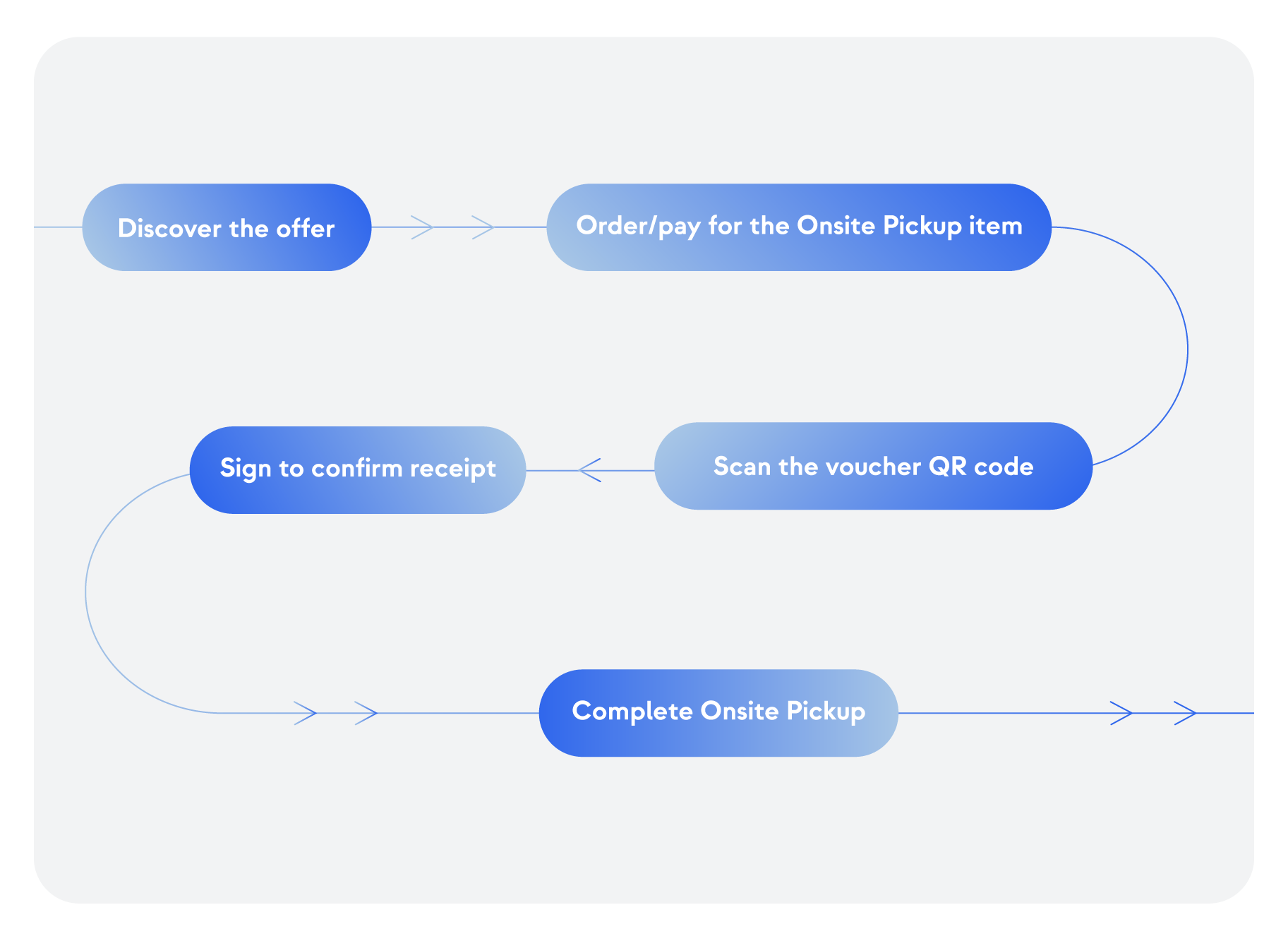
STEP1. Event discovery
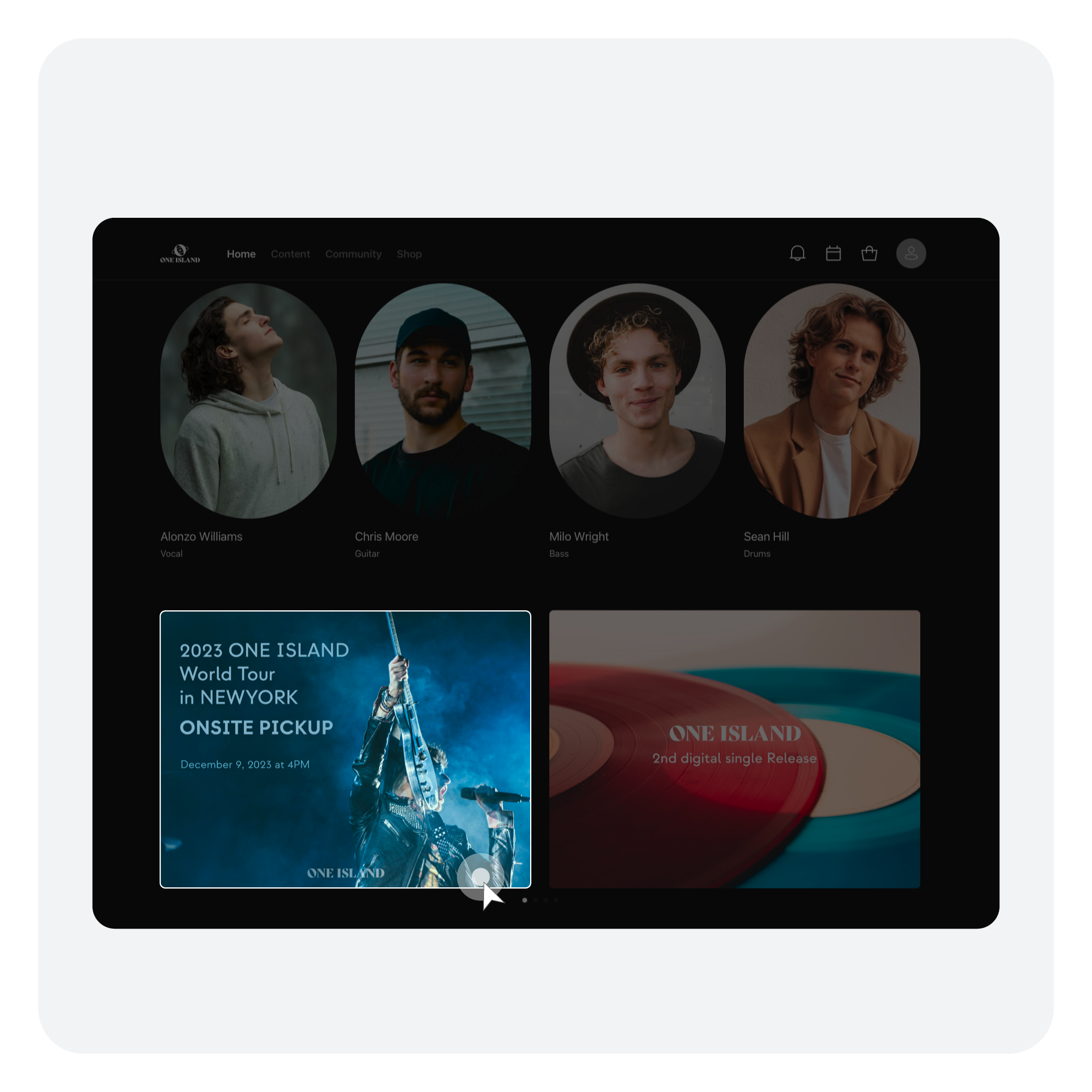
Owner-Admin/Operator | If you've registered an event with Onsite Pickup, it's beneficial to add a dedicated section to your main page highlighting this event. Without showcasing the event URL, your fans will be directed to the SHOP section. There, they’ll see the items for pre-order, but won’t have access to detailed event information.
Fans | Enter the event, whether you discovered it first on b.stage or through another channel.
STEP2. Order/pay for the products
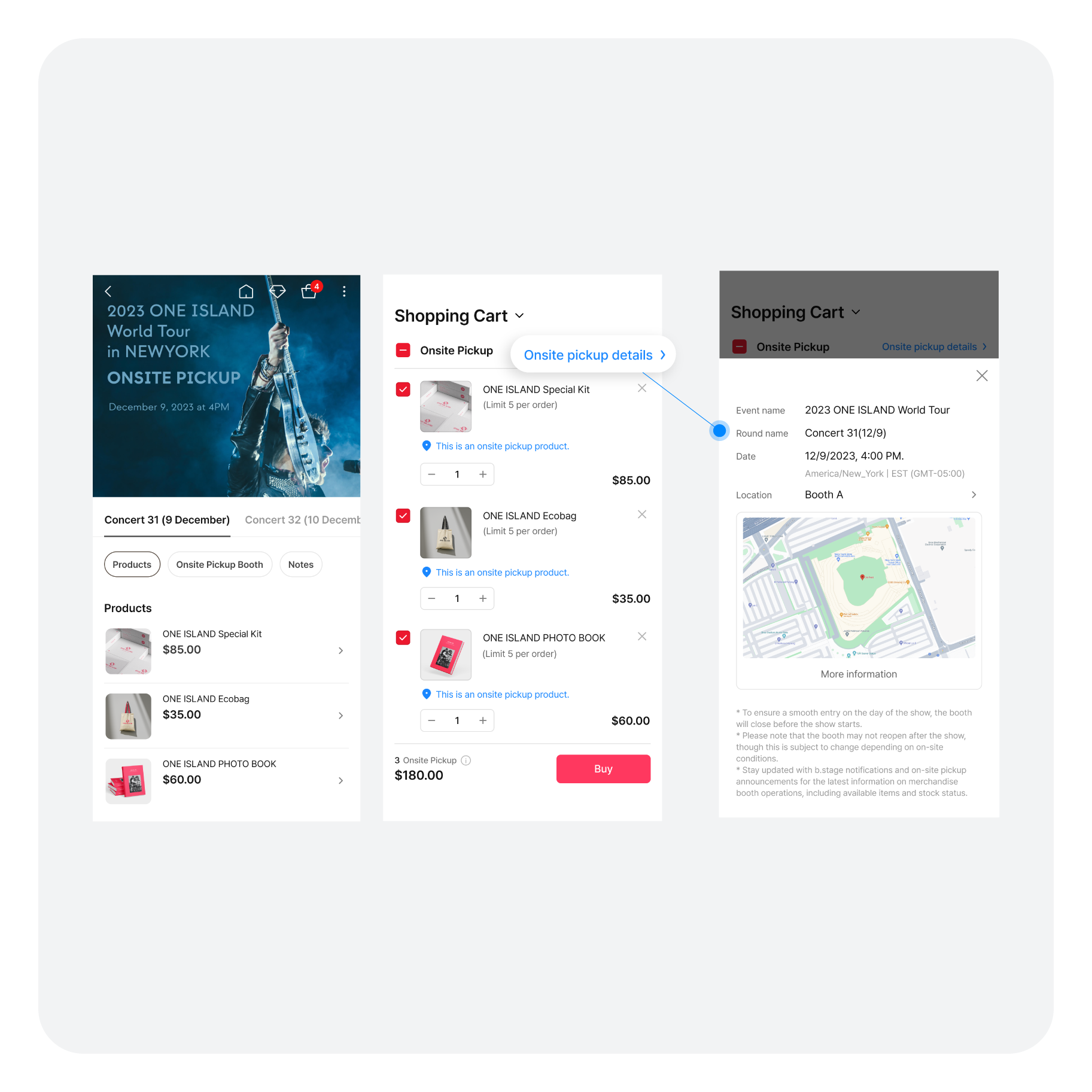
Fans | Choose your desired items and add them to your cart, or buy them right away. Once you have completed your order and payment, remember to save your Onsite Pickup voucher.
* If you haven't already registered for the star's b.stage, sign up first. After signing up, you can proceed to purchase your items for Onsite Pickup.
STEP3. Scan the voucher QR code
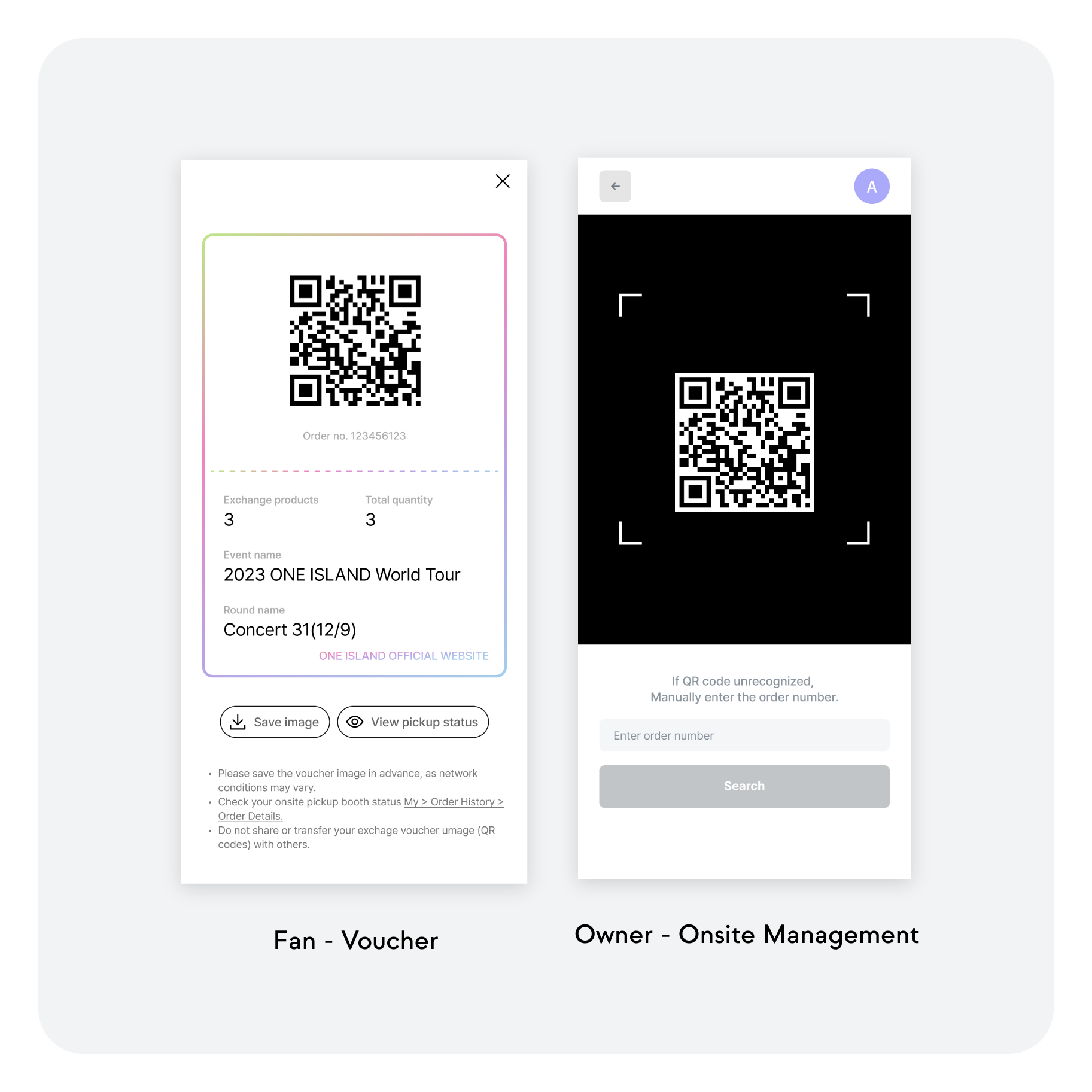
Owner-Admin/Operator | From the admin page, navigate to the [On-site Management] section to share Pickup Notifications with customers directly through the app.
Fans | Follow the instructions provided in the Pickup Notification within the app. When you arrive at the booth for in-person redemption, present the QR code from your voucher to the on-site staff.
Owner - Admin/Operator/Onsite Operator | At the booth, use your mobile device to scan the QR code on the fan's voucher. Once scanned, check the product list and proceed to deliver the order to the fan.
STEP4. Sign the receipt confirmation and confirm the purchase
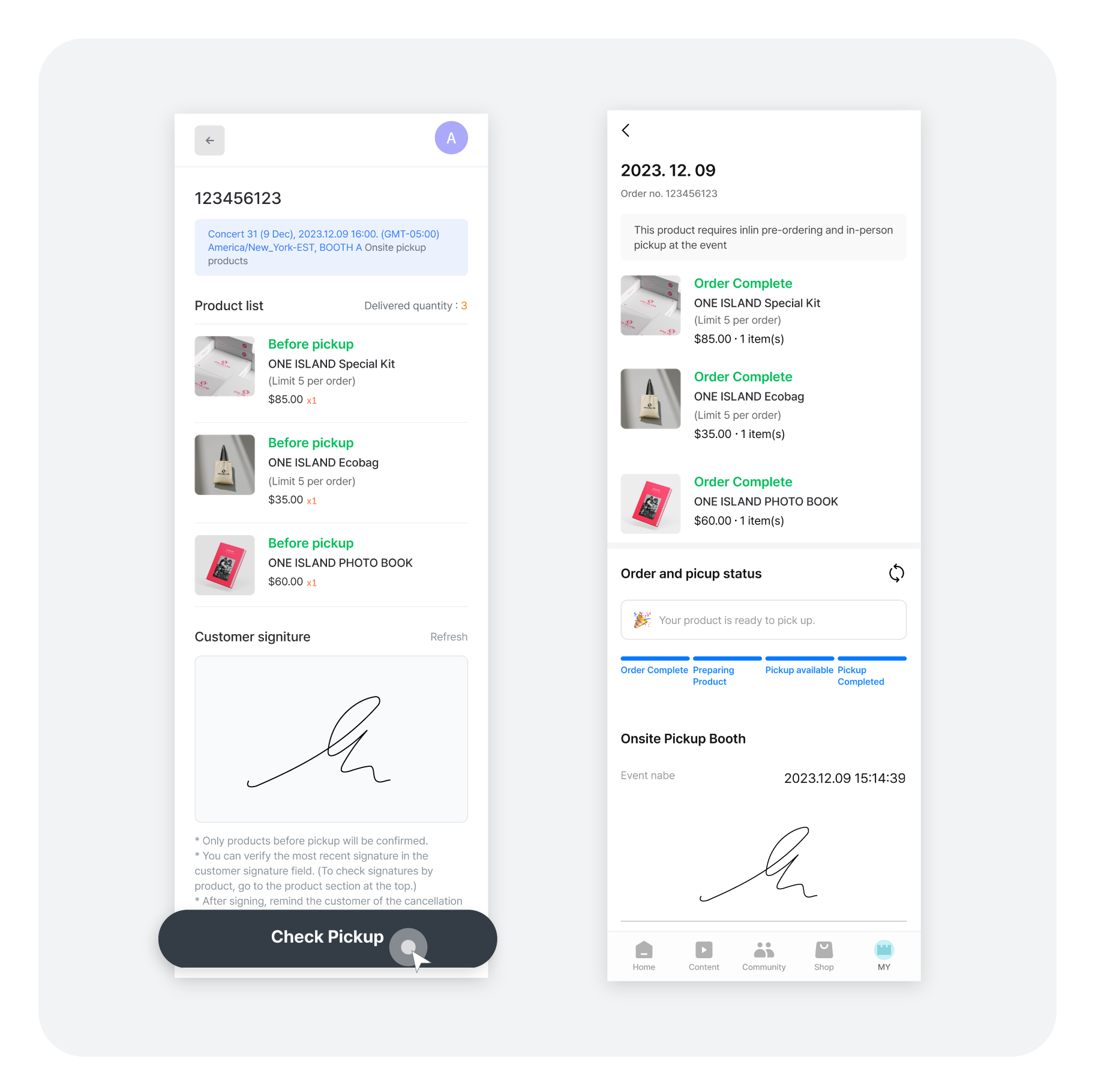
Fans | After receiving your order, sign the customer verification signature to confirm the pickup.
Owner - Admin/Operator/Onsite Operator | Once you get the customer's signature, press the "Confirm Pickup" button to complete the process.
STEP5. Complete the Onsite Pickup
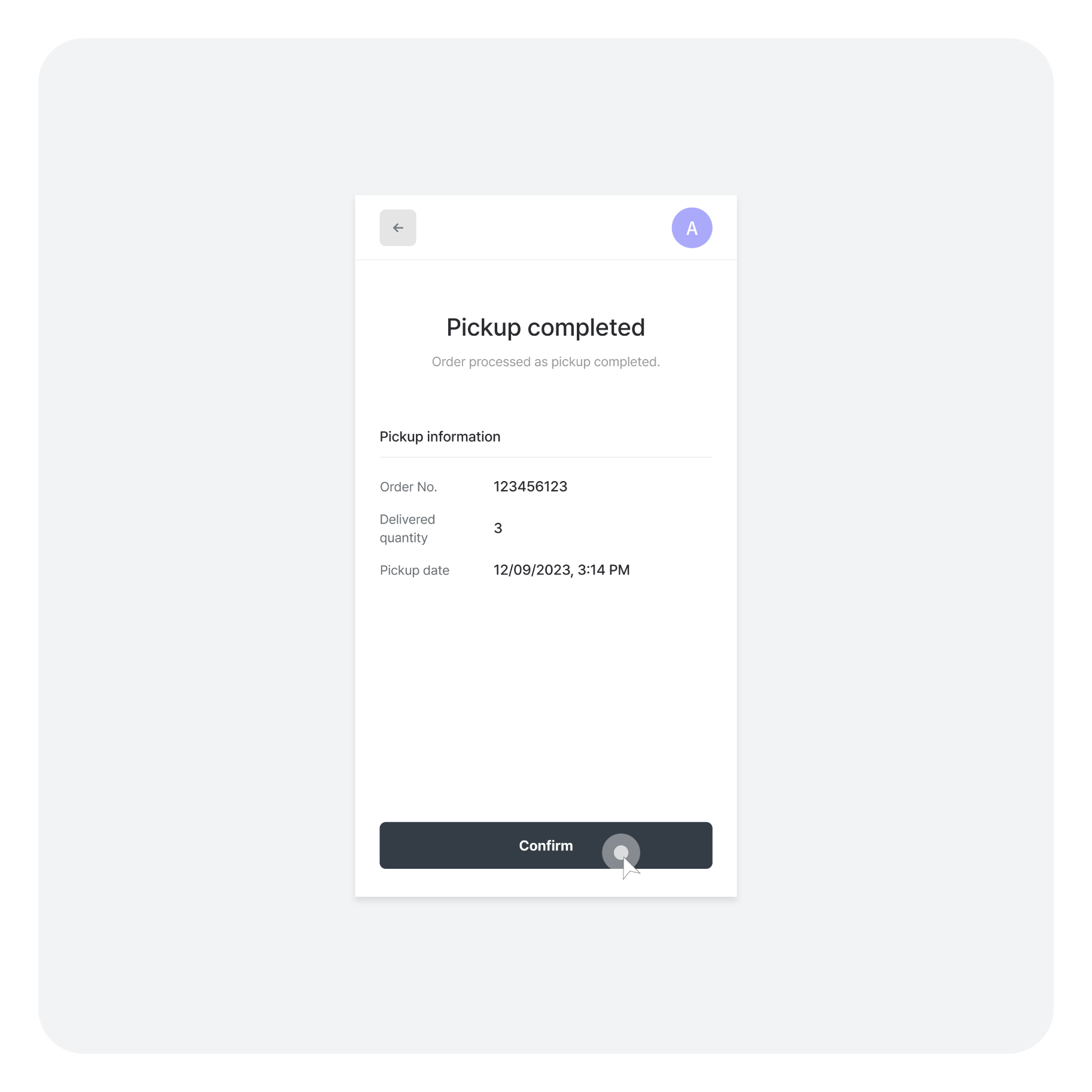
No more long waits or lines – just pick up your merch and go! Now, with the time and energy you save, you're all set to enjoy the concert to the fullest.
Here's an example of how you can use Onsite Pickup on b.stage. ▲ Click on the image to go to The 4 member Band ONE ISLAND’s b.stage.
What has improved?
Keep in mind
b.stage, an all-in-one solution for owners and fans.
We are continuously improving b.stage with new features.
We support owners in fostering positive experiences for their fans.
Related content
b.stage now offers an Onsite Pickup feature, allowing fans to order and pay for merchandise using the b.stage app before the event. After receiving an app notification, they can conveniently collect their orders at the event's merchandise booth.
Pay up front, pick up later — that means less waiting for fans and more efficient merchandise sales for you. This approach works for any offline event, whether it’s a concert, festival, pop-up store, or fan meetup. If you’re organizing an in-person event, consider implementing an Onsite Pickup option. It’s a great way to avoid long lines for fans, while keeping sales, efficiency, and inventory all under centralized control.
#OnsitePickup #Operations #Owner #Fan
Introducing Onsite Pickup
- With this feature, fans can conveniently order and pay for merchandise before the event using the b.stage app. They can then pick up their purchases for Onsite Pickup in the event's merchandise booth upon receiving a notification in the app.
- In-app payment ensures that only the ordered goods are delivered at the booth, adding efficiency and speed to merchandise transactions.
- Fans no longer need to arrive at the venue too early or endure long lines at the merchandise booth to buy their favorite items.
How to use the b.stage Onsite Pickup feature
Let's assume that this is a 40,000-seat concert using the Onsite Pickup feature.
Here’s the experience from a fan's perspective.
Full journey (in-app)
STEP1. Event discovery
Owner-Admin/Operator | If you've registered an event with Onsite Pickup, it's beneficial to add a dedicated section to your main page highlighting this event. Without showcasing the event URL, your fans will be directed to the SHOP section. There, they’ll see the items for pre-order, but won’t have access to detailed event information.
Fans | Enter the event, whether you discovered it first on b.stage or through another channel.
STEP2. Order/pay for the products
Fans | Choose your desired items and add them to your cart, or buy them right away. Once you have completed your order and payment, remember to save your Onsite Pickup voucher.
* If you haven't already registered for the star's b.stage, sign up first. After signing up, you can proceed to purchase your items for Onsite Pickup.
STEP3. Scan the voucher QR code
Owner-Admin/Operator | From the admin page, navigate to the [On-site Management] section to share Pickup Notifications with customers directly through the app.
Fans | Follow the instructions provided in the Pickup Notification within the app. When you arrive at the booth for in-person redemption, present the QR code from your voucher to the on-site staff.
Owner - Admin/Operator/Onsite Operator | At the booth, use your mobile device to scan the QR code on the fan's voucher. Once scanned, check the product list and proceed to deliver the order to the fan.
STEP4. Sign the receipt confirmation and confirm the purchase
Fans | After receiving your order, sign the customer verification signature to confirm the pickup.
Owner - Admin/Operator/Onsite Operator | Once you get the customer's signature, press the "Confirm Pickup" button to complete the process.
STEP5. Complete the Onsite Pickup
No more long waits or lines – just pick up your merch and go! Now, with the time and energy you save, you're all set to enjoy the concert to the fullest.
Here's an example of how you can use Onsite Pickup on b.stage.
What has improved?
- With real-time notifications via the app, fans can now pick up their merchandise without needing to wait in line at the sales booth.
- The simplification of on-site merchandise purchases means fans can spend more time enjoying the event.
- b.stage admins now gain complete visibility into staffing, product forecasting, and order status during events. This allows for more accurate forecasting of quantities and maximizes profits by optimizing sales strategies.
Keep in mind
- Available from b.stage version v.11.0.2.
- This is a paid service available to customers on the PLUS Plan.
- Fans must sign up for the owner's b.stage to be able to order items for Onsite Pickup.
- If you order and pay for an item but fail to pick it up in person, be aware that you might receive an automatic purchase confirmation post-event.
- In the [Event Management] section, there's a possibility that the QR code may not scan correctly if the event details and itinerary are inaccurately entered.
b.stage, an all-in-one solution for owners and fans.
We are continuously improving b.stage with new features.
We support owners in fostering positive experiences for their fans.
Related content
Share this!


